
Multiplex management software
Staggered showtimes, overlapping intervals, larger teams and parking — problems a single screen never has.
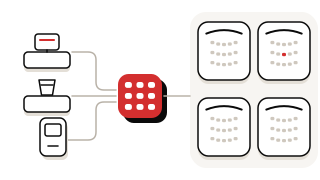
Typical setup
- Four or more screens on one site
- Staggered showtimes
- Several concession counters
- Staff across roles and shifts
- On-site parking
What changes at multiplex scale
01Scheduling across screens lives in a spreadsheet
Show scheduling with conflicts flagged before publishing, across every auditorium in one place.
02Every interval hits the counters at once
A counter POS built for the interval rush: combos in one tap, with several concession counters selling at the same time.
03Screen utilisation is guessed rather than measured
Occupancy by screen sits beside tickets sold and revenue by channel, in one view.
04More staff means less direct oversight
Role-based staff access and shift reports keep accountability from depending on a manager watching every counter.
05Parking congestion starts before the film does
Parking validated against bookings, recorded on the same platform as tickets and concessions.
06Tickets, food and parking run on three systems
Auditoriums, box office, concessions, parking and the back office run on one platform, with one set of records.
Where to start
- 01 · START HEREOperations & scheduling Screen allocation, staggered showtimes, staff access and parking.
- 02Concessions POS The interval rush is where multiplex concession revenue is won or lost.
- 03Ticketing Seat-class, showtime, weekday and group pricing across every auditorium.
- 04Reporting & analytics Occupancy by screen — the figure that turns scheduling from habit into decision.
- 05Online booking & app More sales online means shorter counter queues.
Rolling out across many screens
A multi-screen rollout covers every auditorium's seat map, your pricing structure, scheduling and concession menu. We plan the sequence with you, around your quieter periods.
Questions operators ask
Can Picovico manage staggered showtimes across many screens?
Yes. Show scheduling covers every auditorium and flags conflicts before publishing.
Can we run several concession counters on one system?
Yes. Several concession counters can sell at the same time.
Does Picovico handle cinema parking?
Yes. Parking is validated against bookings and recorded on the same platform.
Can we control what different staff can access?
Yes. Access is role-based, with shift reports.